
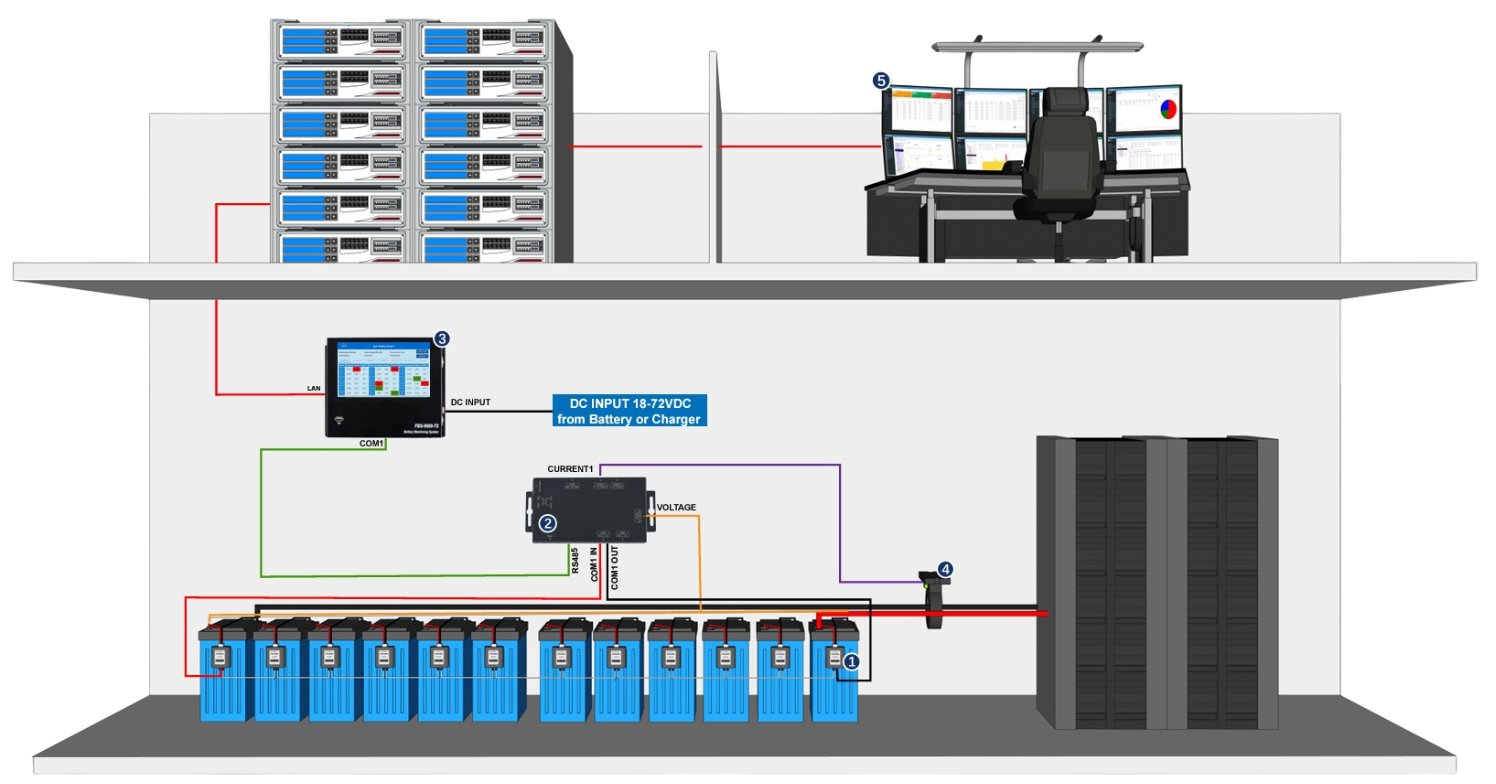
Are you getting the most out of your home battery storage system? Many homeowners invest in battery backup for energy savings, resilience during outages, and to support a greener lifestyle. But simply having a battery isn't enough – you need to actively monitor its performance to ensure you're reaping all the benefits.
Monitoring your home battery system is crucial for maximizing its lifespan, optimizing energy usage, and ensuring reliable backup power when you need it most. It’s about more than just glancing at a screen; it’s about understanding the data and using it to make informed decisions about your home energy efficiency. A helpful tip to start with? Familiarize yourself with your system's default monitoring interface right away. Most modern systems have a dedicated app or web portal. Explore the different sections and identify the key metrics.
Step-by-Step Guide to Monitoring Your Home Battery System
A comprehensive monitoring strategy helps you proactively address potential issues, optimize energy consumption, and ultimately save money. Here’s a step-by-step guide to get you started:1. Understand Your System's Monitoring Capabilities:
Before you can monitor your system, you need to know what data is available to you. This typically involves accessing a dedicated app, web portal, or a physical display unit connected to your home battery storage.
App/Web Portal: Most modern home battery systems come with a companion app or web portal that provides real-time and historical data on your system’s performance. Look for information on battery state of charge, power output, energy consumption, grid interaction, and system status. Physical Display: Some systems also include a physical display unit that provides basic information about the battery's status. While these displays are often less detailed than the app or web portal, they can be useful for quick checks. Inverter Interface:If you have a solar panel system integrated with your battery, your solar inverter might also provide some monitoring data related to battery performance.
2. Identify Key Metrics to Track
Not all data is created equal. Focus on the metrics that provide the most valuable insights into your battery's performance and your energy usage patterns. Here are some key metrics to prioritize: State of Charge (SOC): This indicates the percentage of energy currently stored in your battery. Monitoring SOC helps you understand how much backup power you have available and whether your battery is charging and discharging as expected. Power Output (k W): This measures the rate at which your battery is delivering power to your home or exporting it to the grid. Tracking power output helps you understand how your battery is responding to energy demands. Energy Throughput (k Wh): This measures the total amount of energy that has flowed through your battery over a specific period (e.g., daily, weekly, monthly). Energy throughput is a key indicator of battery health and lifespan. Grid Interaction (Import/Export): This shows how much energy you are importing from or exporting to the grid. Monitoring grid interaction helps you optimize your self-consumption of solar energy and reduce your reliance on the grid. System Status (Errors/Alerts): Pay close attention to any error messages or alerts generated by your system. These could indicate a problem that needs to be addressed promptly. Battery Temperature: Extreme temperatures can affect battery performance and lifespan. Monitor battery temperature to ensure it stays within the recommended range.
3. Set Up Alerts and Notifications
Don't rely on manually checking your system's data every day. Take advantage of the alert and notification features offered by your monitoring platform. Configure alerts for: Low State of Charge: Set an alert to notify you when your battery's SOC falls below a certain threshold (e.g., 20%). This will give you time to prepare for a potential power outage. High Grid Import: Set an alert if you're importing more energy from the grid than usual. This could indicate that your battery is not performing as expected or that your energy consumption has increased. System Errors: Ensure you receive immediate notifications for any system errors or alerts. Unusual Temperature Readings: Alerts for battery temperatures outside the normal range.
4. Analyze Historical Data to Identify Trends
Monitoring your home battery system is not just about reacting to real-time events; it's also about analyzing historical data to identify trends and patterns. Look for: Seasonal Variations in Energy Consumption: Do you use more energy in the summer or winter? Understanding these patterns can help you optimize your battery usage and energy savings. Changes in Battery Performance Over Time: Is your battery's capacity decreasing over time? This could indicate degradation or other issues that need to be addressed. Impact of Lifestyle Changes on Energy Usage:Have you recently added new appliances or changed your usage habits? See how these changes affect your battery performance and energy consumption.
5. Optimize Your Battery Usage Based on Your Findings
The ultimate goal of monitoring your home battery system is to use the data to optimize your energy usage and maximize the benefits of your investment. Here are some ways to do that: Adjust Your Energy Consumption Habits: If you notice that you are frequently exceeding your battery's capacity, consider reducing your energy consumption during peak hours or shifting some of your energy usage to off-peak hours. Optimize Your Battery Charging Strategy: Experiment with different charging schedules to see what works best for your energy usage patterns. For example, you might want to prioritize charging your battery during off-peak hours when electricity rates are lower. Adjust Your Backup Power Settings: If you are primarily using your battery for backup power, you might want to adjust your settings to prioritize battery life over maximum capacity. Consider Adding More Solar Panels: If you find that your battery is consistently running low, you might want to consider adding more solar panels to increase your self-generation capacity.
6. Regular Maintenance and Inspections
Monitoring is an ongoing process that should be combined with regular maintenance and inspections.
Visual Inspection: Regularly inspect your battery system for any signs of damage or wear and tear. Look for corrosion, leaks, or loose connections. Professional Maintenance: Schedule regular maintenance visits with a qualified technician to ensure that your system is operating safely and efficiently. Software Updates:Keep your system's software up to date to ensure that you have the latest features and security updates.
People Also Ask (FAQs)
How often should I check my home battery system's monitoring data?
Ideally, you should glance at the key metrics, such as the State of Charge (SOC) and system status, daily. Deeper analysis and review of historical data should be done weekly or monthly to identify trends and optimize usage. Don't forget to set up alerts for critical events that require immediate attention.
What do I do if I see an error code on my battery system?
First, consult your system's manual or the manufacturer's website to understand the meaning of the error code. Note the error code and any associated details, then contact a qualified technician for assistance. Do not attempt to repair the system yourself unless you are a trained professional.
How can I improve my home's energy efficiency to maximize my battery's performance?
Improving your home's energy efficiency can significantly reduce your energy consumption and extend your battery's runtime. Consider the following: Upgrade to energy-efficient appliances: Look for appliances with the Energy Star label. Improve insulation: Proper insulation helps to keep your home warm in the winter and cool in the summer, reducing your heating and cooling costs. Seal air leaks: Seal any cracks or gaps around windows, doors, and other openings to prevent air leaks. Use LED lighting: LED bulbs use significantly less energy than traditional incandescent bulbs. Install a smart thermostat:A smart thermostat can help you optimize your heating and cooling settings based on your schedule and preferences.
How long should my home battery last?
The lifespan of a home battery depends on several factors, including the type of battery, the depth of discharge, and the operating temperature. Most modern lithium-ion batteries are designed to last for 10-15 years with proper maintenance. Refer to your battery's warranty and manufacturer's specifications for more detailed information.
Can I monitor my battery system if I don't have an internet connection?
Some basic system information, such as State of Charge, is often available on a physical display unit, however, most advanced monitoring features require an internet connection to transmit data to the cloud and provide remote access. Consider investing in a reliable internet connection and backup power for your router to ensure continuous monitoring, especially during grid outages.
By following this step-by-step guide, you can proactively monitor your home battery system, optimize your energy usage, and ensure reliable backup power for years to come. Embrace the power of data and take control of your home's energy future. You've made a smart investment; now, let's make sure you're reaping all the rewards.