
Are you ready to take control of your home’s energy future? Optimizing your energy consumption not only saves you money but also contributes to a more sustainable lifestyle. One critical component of achieving energy independence, especially when using solar power or other renewable energy sources, is an efficient and well-managed battery storage system. But how do you ensure your battery system is operating at its best?
A Battery Management System (BMS) is the unsung hero that safeguards and optimizes your home battery storage. Think of it as the brain of your battery system, constantly monitoring and controlling various parameters to ensure safe, efficient, and long-lasting performance. For homeowners investing in renewable energy at home, understanding and managing your BMS is key to maximizing your energy savings and ensuring reliable backup power systems.
One simple yet crucial step is to regularly check your BMS interface, whether it's a dedicated screen or an app on your phone. Look for any error messages or unusual readings. Early detection of potential issues can prevent costly repairs down the line.
Step-by-Step Guide to Battery Management Systems
Understanding your Battery Management System (BMS) is essential for anyone serious about home energy efficiency and maximizing the benefits of home battery storage. This guide will walk you through the key aspects of BMS, from its basic functions to practical tips for monitoring and maintenance. We’ll cover everything you need to know to keep your system running smoothly and extend its lifespan.
What is a Battery Management System and Why Do You Need One?
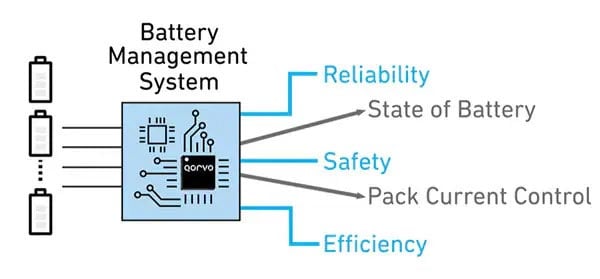
A Battery Management System (BMS) is an electronic system that manages a rechargeable battery (cell or battery pack), such as those used in home battery storage systems for solar power. Its primary functions include: Protecting the battery: Preventing damage from overcharging, over-discharging, over-current, short circuits, over-temperature, and under-temperature. Monitoring the battery: Tracking voltage, current, temperature, and state of charge (So C). Optimizing battery performance: Balancing the charge of individual cells, maximizing battery life, and improving overall efficiency. Communicating with other devices: Providing data and control signals to inverters, charge controllers, and other components of your home energy system.
Think of your BMS as a vigilant guardian, constantly watching over your battery and making adjustments to keep it healthy and performing optimally. Without a BMS, your battery could be vulnerable to damage, resulting in reduced lifespan, decreased performance, and even potential safety hazards. For example, without proper overcharge protection, your lithium-ion battery could overheat, leading to thermal runaway and potentially a fire.
For homeowners, especially those relying on solar panels and battery storage for backup power systems, the BMS is an indispensable part of their investment. It ensures the longevity of your battery, maximizes your energy savings, and provides peace of mind knowing that your system is operating safely and efficiently.
Understanding the Key Components and Functions of a BMS
To effectively manage your BMS, it's important to understand its key components and functions. Here's a breakdown: Voltage Monitoring:The BMS continuously monitors the voltage of each cell (or group of cells) in the battery pack. This is crucial for preventing overcharging and over-discharging, both of which can damage the battery.
Actionable Tip: Many BMS units allow you to set custom voltage thresholds. Consult your battery manufacturer's specifications and adjust these thresholds accordingly to protect your battery. Current Monitoring: The BMS monitors the current flowing into and out of the battery. This is important for preventing over-current conditions, which can cause overheating and damage.
Example: If you have a large appliance that draws a significant amount of current, the BMS will detect this and may limit the current draw to protect the battery. Temperature Monitoring: Temperature is a critical factor affecting battery life and performance. The BMS monitors the temperature of the battery and takes action to prevent overheating or extreme cold.
Case Study: A homeowner living in a hot climate installed a battery system in their garage. Without adequate ventilation, the battery overheated, significantly reducing its lifespan. A BMS with temperature monitoring and automatic shutdown would have prevented this issue. State of Charge (So C) Estimation: The BMS estimates the remaining capacity of the battery. This allows you to know how much energy you have available and helps prevent deep discharge, which can damage the battery.
Practical Application: Imagine you’re planning to use your home battery storage during a potential power outage. Knowing the accurate So C will allow you to manage your energy consumption effectively and ensure you have enough power to last through the outage. Cell Balancing: In a battery pack with multiple cells connected in series, cell voltages can drift apart over time. Cell balancing ensures that all cells are charged and discharged equally, maximizing battery life and performance.
Insight: Some BMS systems have active cell balancing, which actively transfers energy from higher-voltage cells to lower-voltage cells. Others use passive cell balancing, which dissipates excess energy from higher-voltage cells as heat. Communication Interface: Most modern BMS units have a communication interface that allows you to monitor the battery's performance and adjust settings. This interface can be a dedicated screen, a mobile app, or a connection to a home automation system.
Recommendation: Familiarize yourself with your BMS’s communication interface. Regularly check the data it provides and adjust settings as needed to optimize your battery's performance.
Step-by-Step Guide to Monitoring Your BMS
Monitoring your BMS is crucial for identifying potential issues early and ensuring your battery system is operating optimally. Here’s a step-by-step guide:
1.Access the BMS Interface: This could be a dedicated screen, a mobile app, or a web interface. Refer to your BMS manual for instructions on how to access the interface.
2.Check Voltage Levels: Monitor the voltage of each cell or cell group. Ensure that all voltages are within the manufacturer's recommended range.
Warning Signs: Significant voltage differences between cells or voltages outside the recommended range indicate a potential problem.
3.Monitor Current Flow: Track the current flowing into and out of the battery. Ensure that the current is within the BMS's and battery's specifications.
Troubleshooting: Abnormally high or low current could indicate a problem with the charger, inverter, or load.
4.Observe Temperature Readings: Monitor the battery's temperature. Ensure that it is within the recommended operating range.
Action: If the temperature is too high, check for adequate ventilation and consider adding cooling measures. If it's too low, consider adding insulation or heating.
5.Evaluate State of Charge (So C): Check the battery's So C. Ensure that it is not being over-discharged.
Best Practice: Avoid letting the So C drop below 20% to prolong battery life.
6.Review Error Messages: Check for any error messages or warnings displayed by the BMS. Consult the manual to understand the meaning of the error and how to resolve it.
Immediate Action: Don’t ignore error messages. Address them promptly to prevent further damage.
7.Keep Records: Maintain a log of your BMS readings. This will help you track changes over time and identify potential problems early.
Tracking Method: Use a spreadsheet or a dedicated app to record voltage, current, temperature, and So C readings on a regular basis.
Essential Maintenance Tips for Your Battery System
Proper maintenance is essential for extending the lifespan and maximizing the performance of your battery system. Here are some key maintenance tips: Regular Visual Inspections:Periodically inspect your battery and BMS for any signs of physical damage, such as cracks, leaks, or corrosion.
Preventative Measure: Clean any corrosion with a baking soda and water solution. Ensure that all connections are tight and secure. Keep it Clean and Dry: Keep the battery and BMS clean and dry. Dust and moisture can damage the components and reduce performance.
Practical Tip: Use a soft cloth to wipe down the battery and BMS regularly. Ensure Proper Ventilation: Ensure that the battery and BMS have adequate ventilation to prevent overheating.
Installation Note: If your battery is installed in an enclosed space, consider adding a ventilation fan. Software Updates: Keep the BMS software up to date. Manufacturers often release updates that improve performance, add new features, and fix bugs.
Guidance: Check the manufacturer's website for available updates and follow their instructions for installation. Professional Inspections: Consider having your battery system professionally inspected on a regular basis, especially if you notice any unusual behavior.
Peace of Mind: A qualified technician can identify potential problems that you might miss and ensure that your system is operating safely and efficiently.
Troubleshooting Common BMS Issues
Even with proper monitoring and maintenance, you may encounter issues with your BMS. Here are some common problems and how to troubleshoot them: High or Low Voltage Readings: If you notice unusually high or low voltage readings, check the following: Connections: Ensure that all connections are tight and secure.
Charger/Inverter: Verify that the charger or inverter is operating correctly.
Battery Health: The battery itself may be failing. Over-Temperature Alarms: If you receive an over-temperature alarm, check the following: Ventilation:Ensure that the battery has adequate ventilation.
Ambient Temperature: The ambient temperature may be too high.
Load: The battery may be overloaded. State of Charge (So C) Inaccuracy: If the So C reading is inaccurate, try the following: Calibration:Some BMS units require periodic calibration.
Battery Health: The battery may be aging and losing capacity. Communication Errors: If you experience communication errors between the BMS and other devices, check the following: Cables:Ensure that all cables are properly connected.
Compatibility: Verify that all devices are compatible with the BMS.
Software: Update the BMS software.
People Also Ask (FAQs)
How often should I check my Battery Management System?
Ideally, you should check your BMS interface at least once a week. Regular monitoring allows you to identify potential issues early and prevent costly repairs.
What does cell balancing do for my battery?
Cell balancing ensures that all cells in your battery pack are charged and discharged equally, maximizing battery life and overall performance. This is especially important for lithium-ion batteries used in home energy storage.
Can I install a BMS myself?
While some basic BMS units are relatively simple to install, it's generally recommended to have a professional install your BMS, especially if you're not experienced with electrical systems. Improper installation can damage your battery or create a safety hazard.
What if my BMS shows an error code I don't understand?
Consult your BMS manual for a list of error codes and their meanings. If you're still unsure, contact the manufacturer or a qualified technician for assistance. Ignoring error codes can lead to further damage and reduced battery life.
How can I extend the lifespan of my home battery storage?
Proper maintenance, including regular BMS monitoring, adequate ventilation, and avoiding extreme temperatures, can significantly extend the lifespan of your home battery storage. Also, avoid fully discharging your battery regularly; aim to keep the So C above 20%.
By taking the time to understand and manage your Battery Management System, you’re taking a significant step toward maximizing the efficiency and longevity of your home energy system. With consistent monitoring and proactive maintenance, you can enjoy reliable renewable energy at home, lower your energy bills, and contribute to a more sustainable future. You've got this!